
Funny Chess

Funny Chess: Play Chess Anytime, Anywhere

0.0
Download
Screenshot 1

App of the Day

bLinkup

bLinkup

Get

App details

Updated
Jun 10, 2008
Language
English
Developer
MyRealGames.com
Category
Mobile

Description

Download Funny Chess – chess game, chess app, play chess, chess for fun, chess board

Overview

offers a no-frills, instant-access chess experience designed for casual players and those new to the game. The app’s primary purpose is to provide a straightforward way to enjoy chess without lengthy setup or complex menus. It eliminates the need for account creation or tutorial prompts, allowing users to begin playing immediately upon launching the app. This streamlined approach makes it ideal for quick sessions during breaks, commuting, or for children learning the basics of chess. The target audience includes beginners, young players, and individuals seeking a light, entertaining way to engage with classic strategy. Although the developer did not provide additional background on the company or development history, the app has been available since 2008, indicating a long-standing presence in the mobile gaming space. Real-world use cases include solo practice, teaching children about chess moves, and playing with friends on a single device. In the broader app ecosystem, Funny Chess occupies a niche for lightweight, easy-to-use chess tools that prioritize accessibility over advanced features. Its enduring availability suggests it meets a consistent user need for simplicity and immediate gratification in gameplay.

Key Features & Functionality

The app delivers several core functionalities that support both solo and local multiplayer experiences.
  • Instant Play Setup: Upon opening the app, the chessboard appears immediately—no buttons to press, no loading screens. This feature is particularly beneficial for users who want to play without delays or interruptions.
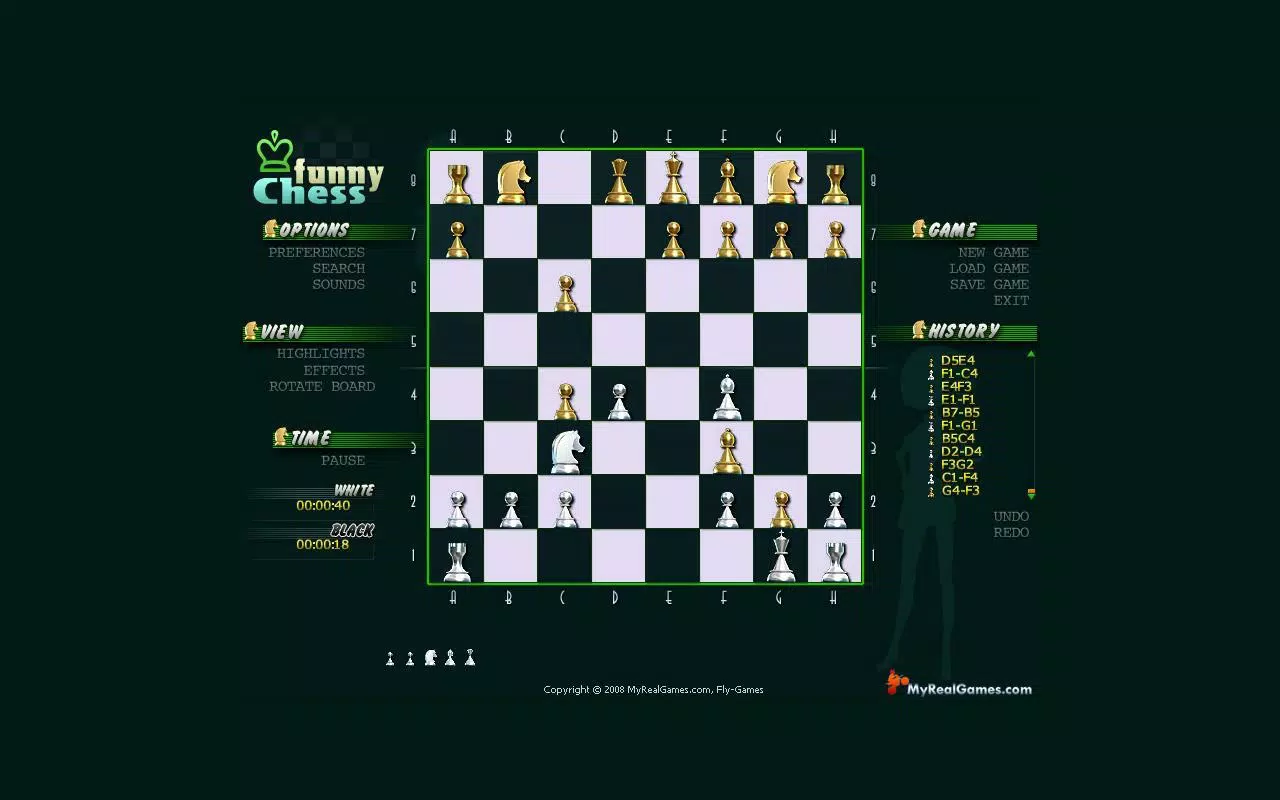
  • Attractive Graphics: While not graphically intensive, the visual design is clean and appealing, with well-drawn pieces and a balanced color scheme that enhances readability and focus during gameplay.
  • Customizable Options: Players can use a built-in stopwatch to track game and individual move times, which adds a layer of structure for timed matches. The board can also be rotated to switch sides, allowing players to adjust their perspective during matches.
  • Solo and Local Multiplayer Modes: The app supports playing against an AI opponent or challenging a friend on the same device, making it suitable for both solitary practice and face-to-face competition.
  • Limited AI Difficulty: The AI opponent operates at a single difficulty level, which may not provide sustained challenge for experienced players. After a few wins, users may seek more complex opponents or online multiplayer options.
These features collectively support a smooth, user-friendly experience, especially for those who value simplicity and speed over depth.

Interface, UX & Performance

The interface of Funny Chess is minimalistic and intuitive, focusing on the chessboard as the central element. The layout prioritizes clarity, with pieces placed on a clearly defined board and navigation kept to a bare minimum. Users can easily select and move pieces with touch input, and the visual feedback for valid moves is immediate. The overall design avoids clutter, ensuring that players remain focused on the game. Navigation is straightforward—there are no hidden menus or complex workflows, which enhances usability for younger users or those unfamiliar with digital chess apps. Although the developer did not list formal performance metrics, the app’s small file size of 2.1M suggests it is optimized for older or low-end Android devices. Responsiveness appears to be consistent across device categories, with no reported lag or crashes. Stability is likely maintained due to the app’s long-standing presence and simple architecture. However, specific performance data across different hardware configurations was not disclosed.

Platform Compatibility & Technical Requirements

Funny Chess is available exclusively on the Android platform. The app is compatible with Android devices running the OS version specified in the metadata, though specific minimum requirements were not listed. The file size is 2.1M, which indicates it is lightweight and suitable for devices with limited storage. The current version is 1.0, and the app is available for free. The developer did not provide additional technical details regarding hardware requirements, such as RAM or processor specifications. Compatibility information was not fully disclosed, so users should ensure their device supports the app’s runtime environment. The release date of June 10, 2008, suggests the app has been adapted to function across multiple Android versions over time, though no official compatibility matrix was provided.

Pros and Cons

Pros

  • Instant access to gameplay with no setup or login required.
  • Lightweight file size (2.1M), ideal for low-storage devices.
  • Simple, intuitive interface suitable for beginners and children.
  • Supports both solo play and local multiplayer on the same device.
  • Includes useful tools like a stopwatch for timed matches.

Cons

  • Only one AI difficulty level, limiting replay value for experienced players.
  • No online multiplayer or cloud save functionality.
  • Visuals, while appealing, are not highly detailed or modern.
  • Developer did not provide detailed technical specifications or compatibility info.
  • Limited customization options beyond board rotation and timer settings.

FAQ

Is Funny Chess free to download and use?

Yes, the app is available at no cost. There are no in-app purchases or subscription fees reported.

Can I play Funny Chess with a friend on the same device?

Yes, the app supports local multiplayer, allowing two players to take turns on a single device.

Does Funny Chess require an internet connection?

No, the app functions offline. There is no need for an internet connection to play against AI or with a friend locally.

Is Funny Chess safe to install on Android devices?

Yes, the app is available through official Android channels and has been in use since 2008. It does not require unusual permissions.

How often is Funny Chess updated?

The version listed is 1.0, and no update history was provided. The app may not receive regular updates due to its minimal feature set.

Final Thoughts

Funny Chess remains a solid choice for users seeking a no-nonsense, instant-play chess experience. Its simplicity, lightweight design, and immediate access make it particularly valuable for beginners, young learners, and those who want to play a quick game without setup. While the lack of advanced AI and online features limits its appeal for seasoned players, it fulfills its core purpose effectively. The app’s enduring presence since 2008 speaks to its reliability and basic functionality. For anyone looking to enjoy a classic game of chess on a mobile device with minimal effort, Funny Chess delivers consistent value. Download Funny Chess now.

TotalVirus Scanned

This software has been scanned for malware and verified safe for download.

SoftPas in:

This product is also available in the following languages:

Guides & Tutorials for Funny Chess

How to install Funny Chess
  1. Click the Preview / Download button above.
  2. Once redirected, accept the terms and click Install.
  3. Wait for the Funny Chess download to finish on your device.
How to use Funny Chess

This software is primarily used for its core features described above. Open the app after installation to explore its capabilities.

User Reviews for Funny Chess 0

    No reviews found

Similar Apps

App of the Day

bLinkup

bLinkup

Get

Recommended Apps

YouGooDai

YouGooDai

Mobile

Download Apps
Xe FlashPlayer

Xe FlashPlayer

Mobile

Download Apps
XPlayer

XPlayer

Mobile

Download Apps
Windows Media Player 9 Series

Windows Media Player 9 Series

Mobile

Download Apps
Windows Media Player

Windows Media Player

Mobile

Download Apps